|
|
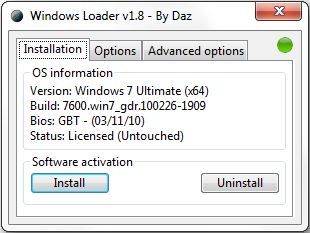
& @2 d9 G) t" |5 l& h【軟體名稱】:Windows 7 Loader v1.8.4 (x86 & x64)8 ]0 r, ~8 E) v: K5 `% n0 E
【軟體語言】:English5 V( X4 A9 f) k6 T6 i% \$ M
【軟體分類】:啟動破解& F2 O1 U. `1 I2 k
【軟體格式】:RAR
, K0 F* y( C' a( a6 O3 v; u【檔案大小】:1.40 MB' U. Q, u7 J r7 i+ d! K
【放置空間】:xun6/ RapidShare/ depositfiles% V% a4 V& Q2 d+ l% k8 Q" f1 t P+ ?
【解壓密碼】:no
" u7 h4 ?1 X; v2 \3 I- Y4 ` 3 m% {& v5 U3 n 3 m% {& v5 U3 n
Do you have the WAT update installed, KB971033? If yes you may have got flagged as non-genuine, in order to become genuine again just do the following.
: C n; _" A" _: A- s
2 T4 {8 D- y$ L" }* Launch the loader application and select to uninstall( r \. W4 y* l0 [. Q) t
* Restart the PC
) P- t" w+ ?7 a' |* Install the loader and restart the PC7 v' O" ~ |& m4 U0 M8 r4 U
* Visit the following website to revalidate Windows: www.microsoft.com/genuine/
& K9 B8 A. q4 q, p" z
4 L4 z2 @4 A/ F$ D6 P. @6 ~
. F2 R; n9 d3 K/ k9 M' V9 ~Is Windows failing to boot after you installed the loader? Just do the following.' z# K$ E% \+ f( H
6 I0 }# v; ~; E
* Boot up the PC from your Windows installation disk/ U. N! I. u# D. H; E8 X E& ?
* Select the "Repair your computer" option+ T2 t; Z. f- H% O9 G
* Select "Command Prompt"2 S, l; M# \5 `' Q6 {( L/ W; ^
* Input "bootsect.exe /nt60 SYS /force" (without quotes)
5 x* [& d6 @" B g$ ]9 {* Restart the PC0 w" f7 z0 g8 Y# ^+ |
. m1 \8 w' c p; M$ s" H7 I, _( K& M9 ~ ! }+ C8 c1 c# i: d% y- U& K ! }+ C8 c1 c# i: d% y- U& K
 % S, \% r% l# f9 T6 {* N % S, \% r% l# f9 T6 {* N

3 v4 f" e- Y3 LVersion 1.8.4; V3 J* T) Q( s) r5 J
* Added a new GRLDR version (Calculates the EBDA end 256 bytes lower)
; I' K; e7 U7 `+ {; V0 M+ k' x* Added the ability to give the SLIC a custom position (Useful if SLIC emulation fails under the default options)7 s/ g' s y9 H p& B
* Added Olidata SLIC, certficiate and serial
% y% O& J8 p* I4 G9 s& J
f8 d8 y* }! ?: b/ A f4 h
5 r2 i6 Z. A7 `( E& b7 E8 M9 t4 M3 D; i% k6 J
( A( B I0 @; x+ L, O5 n" J3 l D. \% `9 c/ a' k' T9 z" {6 ]
: j U& _5 j8 | c t7 x& Z 
; E( F7 e7 P- O6 e. |Windows.7.Loader.v1.8.4-DAZ
7 O6 z0 v6 Q f! p
' q3 [5 W9 x% `0 t. Q- DWindows.7.Loader.v1.8.4-DAZ
$ f& [' R! \3 ]& ~! C$ l* s9 w. y1 @ X! w3 k2 p. n
Windows.7.Loader.v1.8.4-DAZ
% y: n% _; G1 J5 q
|
|


 IP卡
IP卡 狗仔卡
狗仔卡 發表於 25-6-2010 00:18:51
 提升卡
提升卡 置頂卡
置頂卡 沉默卡
沉默卡 喧囂卡
喧囂卡 變色卡
變色卡 顯身卡
顯身卡